



9 562 marques
2 694 000 modes d'emploi


Téléchargez vos notices, c'est GRATUIT ! Diplodocs vous permet de télécharger plusieurs types de documents pour mieux utiliser votre KORG GT-12 : mode d'emploi, notice d'utilisation, manuel d'instruction.
Chercher une marque
Recherche avancée

Besoin d'aide pour votre produit ?
Consulter les avis sur KORG GT-12

Mode d'emploi KORG GT-12

Diplodocs permet de télécharger le mode d'emploi KORG GT-12 .

Télécharger le mode d'emploi intégral (350 Ko)


Vous pouvez télécharger les notices suivantes connexes à ce produit :
KORG GT-12


Aperçu des 3 premières pages de la notice

Vous avez désactivé JavaScript ou bien vous avez une ancienne version d'Adobe Flash Player.
Télécharger la dernière version de Flash Player.
Extrait du mode d'emploi : notice KORG GT-12

Les instructions détaillées pour l'utilisation figurent dans le Guide de l'utilisateur.

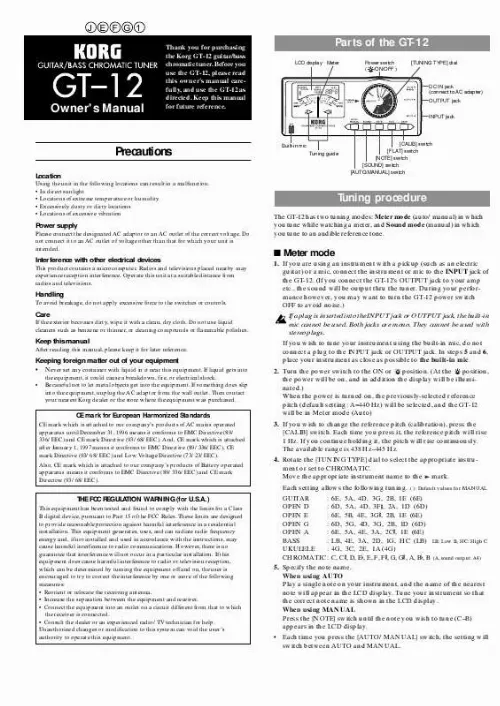
Owner's Manual Thank you for purchasing the Korg GT-12 guitar/bass chromatic tuner. Before you use the GT-12, please read this owner's manual carefully, and use the GT-12 as directed. Keep this manual for future reference. Par ts of the GT-12 LCD display Meter Power switch ( /ON/OFF ) [TUNING TYPE] dial DC IN jack (connect to AC adapter) OUTPUT jack INPUT jack Precautions Location Using the unit in the following locations can result in a malfunction. · In direct sunlight · Locations of extreme temperature or humidity · Excessively dusty or dirty locations · Locations of excessive vibration Built-in mic Tuning guide [CALIB] switch [FLAT] switch [NOTE] switch [SOUND] switch [AUTO/MANUAL] switch Tuning procedure The GT-12 has two tuning modes: Meter mode (auto/manual) in which you tune while watching a meter, and Sound mode (manual) in which you tune to an audible reference tone. Power supply Please connect the designated AC adaptor to an AC outlet of the correct voltage. Do not connect it to an AC outlet of voltage other than that for which your unit is intended. Interference with other electrical devices This product contains a microcomputer. Radios and televisions placed nearby may experience reception interference. Operate this unit at a suitable distance from radios and televisions. s Meter mode 1. If you are using an instrument with a pickup (such as an electric guitar) or a mic, connect the instrument or mic to the INPUT jack of the GT-12. (If you connect the GT-12's OUTPUT jack to your amp etc., the sound will be output thru the tuner. During your performance however, you may want to turn the GT-12 power switch OFF to avoid noise.) If a plug is inserted into the INPUT jack or OUTPUT jack, the built-in mic cannot be used. Both jacks are mono. They cannot be used with stereo plugs. If you wish to tune your instrument using the built-in mic, do not connect a plug to the INPUT jack or OUTPUT jack. In steps 5 and 6, place your instrument as close as possible to the built-in mic. 2. Turn the power switch to the ON or position. (At the position, the power will be on, and in addition the display will be illuminated.) When the power is turned on, the previously-selected reference pitch (default setting: A=440 Hz) will be selected, and the GT-12 will be in Meter mode (Auto) 3. If you wish to change the reference pitch (calibration), press the [CALIB] switch. Each time you press it, the reference pitch will rise 1 Hz. If you continue holding it, the pitch will rise continuously. The available range is 438 Hz­445 Hz. 4. Rotate the [TUNING TYPE] dial to select the appropriate instrument or set to CHROMATIC. Move the appropriate instrument name to the mark. Each setting allows the following tuning. ( ): Default values for MANUAL Handling To avoid breakage, do not apply excessive force to the switches or controls. Care If the exterior becomes dirty, wipe it with a clean, dry cloth. Do not use liquid cleaners such as benzene or thinner, or cleaning compounds or flammable polishes. Keep this manual After reading this manual, please keep it for later reference. Keeping foreign matter out of your equipment · Never set any container with liquid in it near this equipment. If liquid gets into · the equipment, it could cause a breakdown, fire, or electrical shock. Be careful not to let metal objects get into the equipment. If something does slip into the equipment, unplug the AC adaptor from the wall outlet. Then contact your nearest Korg dealer or the store where the equipment was purchased. CE mark for European Harmonized Standards CE mark which is attached to our company's products of AC mains operated apparatus until December 31, 1996 means it conforms to EMC Directive (89/ 336/EEC) and CE mark Directive (93/68/EEC). And, CE mark which is attached after January 1, 1997 means it conforms to EMC Directive (89/336/EEC), CE mark Directive (93/68/EEC) and Low Voltage Directive (73/23/EEC). Also, CE mark which is attached to our company's products of Battery operated apparatus means it conforms to EMC Directive (89/336/EEC) and CE mark Directive (93/68/EEC). THE FCC REGULATION WARNING (for U.S.A.) This equipment has been tested and found to comply with the limits for a Class B digital device, pursuant to Part 15 of the FCC Rules. These limits are designed to provide reasonable protection against harmful interference in a residential installation. This equipment generates, uses, and can radiate radio frequency energy and, if not installed and used in accordance with the instructions, may cause harmful interference to radio communications. However, there is no guarantee that interference will not occur in a particular installation. If this equipment does cause harmful interference to radio or television reception, which can be determined by turning the equipment off and on, the user is encouraged to try to correct the interference by one or more of the following measures: · Reorient or relocate the receiving antenna. · Increase the separation between the equipment and receiver. · Connect the equipment into an outlet on a circuit different from that to which the receiver is connected. · Consult the dealer or an experienced radio/TV technician for help. Unauthorized changes or modification to this system can void the user's authority to operate this equipment. GUITAR : OPEN D : OPEN E : OPEN G : OPEN A : BASS : UKULELE : CHROMATIC : 6E, 5A, 4D, 3G, 2B, 1E (6E) 6D, 5A, 4D, 3F , 2A, 1D (6D) 6E, 5B, 4E, 3G , 2B, 1E (6E) 6D, 5G, 4D, 3G, 2B, 1D (6D) 6E, 5A, 4E, 3A, 2C , 1E (6E) LB, 4E, 3A, 2D, 1G, HC (LB) LB: Low B, HC: High C 4G, 3C, 2E, 1A (4G) C, C , D, E , E, F, F , G, G , A, B , B (A, sound output: A4) 5. Specify the note name. When using AUTO Play a single note on your instrument, and the name of the nearest note will appear in the LCD display. Tune your instrument so that the correct note name is shown in the LCD display. When using MANUAL Press the [NOTE] switch until the note you wish to tune (C­B) appears in the LCD display. · Each time you press the [AUTO/MANUAL] switch, the setting will switch between AUTO and MANUAL. 6. Play a single note on your instrument, and tune it so that the needle of the meter is at the 0 position (center) and both indicators of the tuning guide are lit. While tuning, do not allow extraneous sounds to enter the mic. AUTO : Meter mode (Auto) MANUAL : Meter mode (manual) SOUND : Sound mode (manual) String number (not displayed for CHROMATIC) Reference pitch (calibration) Remaining battery power Note name (C, C , D, E , E, F, F , G, G , A, B , B) Flat tuning Octave (displayed only for CHROMATIC) Adjusting the zero point of the meter needle When the GT-12 has been used for an extended period, normal aging may cause the meter needle to drift away from the 0 position (center). To ensure accurate tuning, please reset the meter needle to the 0 position. 1. While holding down the [AUTO/MANUAL] switch, turn the power switch ON, and check whether the meter needle indicates the 0 position. 2. If it does not indicate the 0 position, refer to the diagram in the above section "Replacing the batteries, and the memory function," open the battery cover, and use a small Philips (+) screwdriver (such as a jeweler's screwdriver) to rotate the adjustment control so that the needle indicates 0. 3. After making the adjustment (or if the meter needle indicated 0 in step 1), press any one of the switches to return to normal operation, and close the battery cover. Tuning is correct when the needle indicates the 0 position (center) and both tuning guide indicators are lit. Specifications 12 note equal temperament A0­C8 C2­C7 (5 octaves) Meter (auto/manual) Sound (manual) Flat tuning : 1­4 semitones (semitone steps) Calibration range : A4=438­445 Hz (1 Hz steps) Detection accuracy : +/-1 cent Sound accuracy : C2 (65.4 Hz)­B5 (987.8 Hz) +/-0.72 cents or better C6 (1047 Hz)­C7 (2093 Hz) +/-1.45 cents or better Tuning guide range : Auto (chromatic) -50 cents­ -3 cents : -3 cents­ +3 cents :, +3 cents­ +50 cents : Manual -500 cents­ -3 cents : -3 cents­ +3 cents :, +3 cents­ +500 cents : Connectors : INPUT (1/4" mono), OUTPUT (1/4" mono), DC IN (9V) Power supply : AA batteries x 2 (3V), or AC adapter ( ) Battery life : Approximately 100 hours (Alkaline batteries, Meter mode, A4 continuous input) Dimensions (WxHxD) : 140.5x60.0x39.5mm (5-1/2" x 2-3/8" x 1-9/16") Weight : 185g (6.53 oz) : including the battery Included items : AA batteries x 2 for checking operation Options (sold separately): AC adapter ( ) * Appearance and specifications are subject to change without notice. Scale Range Reference tone Tuning modes : : : : s Sound mode 1. Make the settings described in steps 1­4 of "Meter mode." 2. Press the [SOUND] switch to enter Sound mode (manual). 3. Press the [NOTE] switch until the note to which you wish to tune appears in the LCD display. 4. Listen to the pitch sounded by the GT-12, and tune your instrument accordingly. · To return to Meter mode, press the [AUTO/MANUAL] switch. q Flat tuning When the [TUNING TYPE] dial is set to GUITAR or BASS, you can use Meter mode or Sound mode to tune to a pitch that is lowered by 1­4 semitones ( ­ ) for the specified note. 1. As described in "Meter mode" or "Sound mode," make the note you wish to flatten by 1­4 semitones appear in the LCD display. Set the [TUNING TYPE] dial to either GUITAR or BASS. Flat tuning can only be used for these selections. 2. Press the [FLAT] switch to select the number of semitones that you wish to lower the selected note. The LCD screen will indicate ­ (1­4 semitones). 3. Tune your instrument. Replacing the batteries, and the memor y function As the batteries begin to run down, accurate tuning will become more difficult. Check the battery indicator in the LCD display, and replace the batteries as soon as necessary. The batteries are also used to preserve the memory when the power is turned off, allowing the reference pitch, meter mode (manual), and the note you selected for Sound mode to be remembered (Memory function). When the batteries are removed or if they run down completely, the various settings preserved by the memory function will be reset. (If an AC adapter is connected to the GT-12 and plugged into an AC outlet, the settings will not be reset.) Even if you are using the GT-12 with an AC adapter, you should leave the batteries installed. 1. While lightly pressing this area, slide the cover in the direction of the arrow to open the battery cover. 3. Close the battery cover. 2. Insert two AA Adjustment batteries. Be sure to control observe the correct Using the tilt slit The slit on the back of the GT-12 allows you to tilt it for more convenient operation. To tilt the unit, insert a coin etc. as shown below. polarity (+, ­). Manuel d'utilisation Nous vous remercions d'avoir fait l'acquisition de l'accordeur chromatique pour guitare/basse GT12 de Korg. Avant d'utiliser cet appareil, nous vous demandons de lire attentivement le présent manuel d'utilisation et de bien respecter les instructions fournies. Veuillez également conserver le manuel dans un endroit sûr afin de pouvoir le consulter ultérieurement. Différents éléments du GT-12 Affichage LCD Indicateur Interrupteur d'alimentation ( /ON/OFF ) Bouton rotatif [TUNING TYPE] (type d'accordage) Prise DC IN (pour raccorder un adaptateur) Prise OUTPUT (sortie) Prise INPUT (entrée) Précautions à prendre Emplacement L'utilisation de l'appareil dans les endroits suivants risquerait d'être la cause d'un mauvais fonctionnement: · Sous les rayons directs du soleil · Dans des endroits de températures extrêmes ou d'une humidité excessive. · Dans des endroits excessivement sales ou poussiéreux. · Dans des lieux sujets à des vibrations excessives. Micro incorporé Repères d'accordage Sélecteur de calibrage [CALIB] Sélecteur bémol [FLAT] Sélecteur de note [NOTE] Sélecteur de son [SOUND] Sélecteur de mode automatique/manuel [AUTO/MANUAL] Méthode d'accordage Le GT-12 est équipé de deux modes d'accordage : le mode Indicateur (Meter) (auto/manuel) dans lequel vous accordez l'instrument en regardant la position de l'indicateur et le mode son (Sound) (manuel) dans lequel vous accordez l'instrument sur un son de référence audible. Alimentation DC9V Veuillez raccorder l'adaptateur secteur fourni à une prise de courant fournissant la tension adéquate. Ne jamais le raccorder à une prise d'un autre voltage que celui prévu pour l'appareil. Interférences avec d'autres appareils électriques Cet instrument contient un micro-ordinateur. Les postes de radio et de télévision situés à proximité peuvent par conséquent souffrir d'interférences à la réception. Veuillez dès lors faire fonctionner cet appareil à une distance raisonnable de postes de radio et de télévision. s Le mode indicateur (Meter) 1. Si vous utilisez un instrument avec un ampli (comme une gu ...

  Know our Partners   Foire aux questions   Contactez l'équipe Diplodocs   Dernières recherches
Derniers ajouts
  Sitemap
Les marques commençant par la lettre A B C D E F G H I J K L M N O P Q R S T U V W X Y Z #
Copyright © 2005 - 2008 - Diplodocs - Tous droits réservés.
Les noms de marques cités appartiennent à leurs propriétaires respectifs.
